Release Notes
Version 1.4.5
September 13, 2026
- Grams added as a weight unit
- Improved CSV exports
- Improved captions for piece images
- Line sheets now show SKUs and have a cleaner layout
- More reliable file sharing
- Minor bug fixes and improvements
Version 1.4.4
August 29, 2026
- Clay cost — set a price per bag on each clay body and see clay cost in your piece cost estimate
- Recent firings — add your last used firing setups in one tap
- Image captions — add a caption to any piece photo
Version 1.4.3
August 25, 2026
- Minor bug fixes and improvements
Version 1.4.2
August 21, 2026
- Clay Weight is supported in New Piece Workflow
- Clay Weight is included in the summary page when adding a new piece
- Minor improvements to Sales feature
- Minor UX improvements
Version 1.4.1
August 16, 2026
- Max number of finishes per piece increased to 20
- Clay weight page configurable from the New Piece Workflow
- Clay weight field added to summary page when adding a new piece
- Minor bug fixes and improvements
Version 1.4.0
August 14, 2026
- Minor UI improvements
- Minor bug fixes and improvements
Version 1.3.9
August 11, 2026
- Export products to CSV to import into online stores (Squarespace, Shopify, Etsy, or Big Cartel)
- Improve tablet styling
- Minor bug fixes and improvements
Version 1.3.8
August 7, 2026
- Minor updates to Sales and Maker Insights
- Minor bug fixes and improvements
Version 1.3.7
August 2, 2026
- Minor bug fixes and improvements
Version 1.3.6
July 1, 2026
NEW PRO FEATURES
- Sales – Track and manage your sales, inventory, and transactions
- Sales Insights – See your sales trends and insights
- Line Sheet – Generate a line sheet for your products in sales
- Cost Estimation – Calculate the cost of a piece using labor and firing fees
NEW FEATURES
-
Maker Toolbox – Configure and access your most used tools from the bottom nav bar
-
New Piece Workflow – Customize the steps to add a new piece (now on starter plans)
-
Minor bug fixes and improvements
Version 1.3.5
June 16, 2026
- NEW PRO FEATURE
Use firing services to calculate firing fees for your pieces
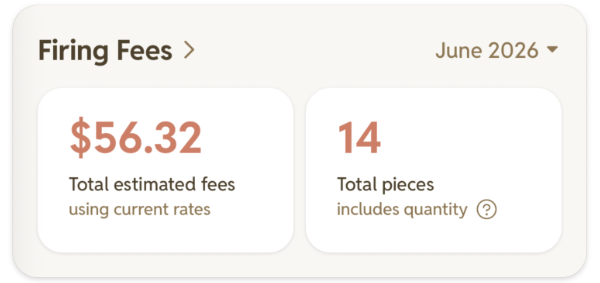 Go to Profile > Firing Services to get started.
 - Minor bug and performance fixes and UI updates
Version 1.3.4
June 14, 2026
- Improve translations
- Increase max piece image limit to 10 for Starter plan
- Add firings preference toggle to show/hide firings on piece pages
- Minor bug and performance fixes and UI updates
Version 1.3.3
June 8, 2026
- Language support for Danish, German, French, and Portuguese
- Ability to add recent finishes to pieces for quicker finish entries
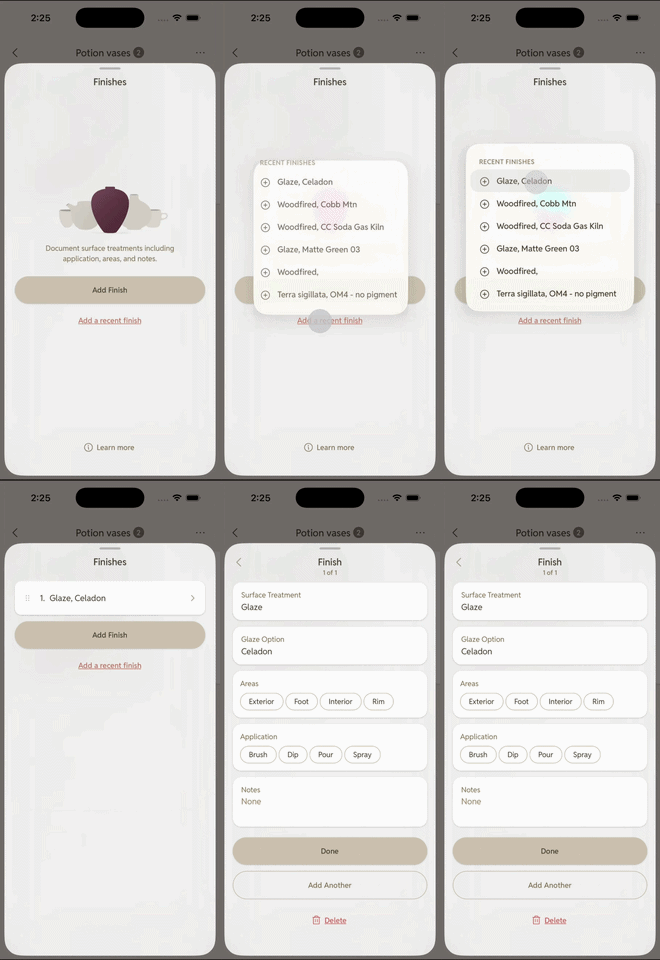
- Minor bug fixes and UI updates
Version 1.3.2
June 2, 2026
- Language support for English, Spanish, Dutch, and Italian
- Support separate preferences for length and weight units
- Support ounces and millimeters as units
- Track how many times a finish is applied. Tap an application method (like dip) to cycle through x1, x2, and x3, or tap again to clear it.
- Minor bug fixes and UI updates
- Minor performance improvements
Version 1.3.1
May 26, 2026
- Smoother animations when editing piece stage, finish, and firing
- Minor bug fixes and UI updates
- Minor performance improvements
Version 1.3.0
May 20, 2026
- Improved liquid glass UI
- Add image crop step when adding images from home page
- Minor bug fixes and UI updates
Version 1.2.9
May 19, 2026
- Quick actions menu when long pressing on tags for archive and delete
- Minor bug fixes and UI updates
- Minor performance improvements
Version 1.2.8
May 8, 2026
- Minor bug fixes and UI updates
Version 1.2.7
May 8, 2026
- Support cropping when setting or editing moodboard cover images
- Improved moodboard post move options
- Minor bug fixes and UI updates
Version 1.2.6
May 2, 2026
- Improved workflow for piece stage, finish, and firing forms
- "What's New" page to see what's changed in each update
- Minor bug fixes and UI updates
- Minor performance improvements
Version 1.2.5
May 2, 2026
- Liquid Glass UI
- Moodboards feature for collecting ideas for pieces
- "Add a copy" in the piece add flow
- Various minor bug and styling fixes
- Notes for clay body and surface treatment options
- Minor bug fixes and UI updates
Version 1.2.0
March 26, 2026
ACCOUNT & CLOUD STORAGE
- Sign in with Google or Apple to back up and sync your pieces across devices. Your data stays local if you prefer, signing in is optional.
NOTES & ORGANIZATION
- Rich text editor for piece notes – use headings, lists, links and more to keep your notes well organized.
- Checklists in notes – check off tasks directly inside your notes. This replaces the separate tasks feature from the previous version.
PIECE MANAGEMENT
- Quantity field – track multiple copies of the same piece without duplicating entries.
- Image Cropping – use the crop editor to focus in on specific details or pieces within an image.
- Finish application/areas – include finish details like brush, dip, exterior, rim, and footer.
- Firings – manage firing details including type, cone, atmosphere, and notes.
- Finished Weight – in addition to tracking the initial clay weight, you can also record the finished weight of each piece.
- Trash – deleted pieces go to trash first, so you can restore or permanently delete them when you're ready.
- Archive tags – retire tags you no longer use without losing pieces associated with them. Archived tags stay linked to existing pieces but won't clutter your tag list.
- Image Gallery – alternative way to view pieces photos within a grid view.
SEARCH & DISCOVERY
- Search, filter, and sort your piece archive – find pieces by name, tag, clay body, stage, and more.
- Pull down on the home screen to quickly open search without scrolling to the top.
DESIGN & POLISH
- Redesigned logo and app icon.
- Dark mode and adaptive app icons on iOS 18+.
- Smoother and faster page transitions throughout the app.
FIXES & IMPROVEMENTS
- More guides across the app to help with onboarding and feature discovery.
- Summary page in the add piece flow now includes notes.
- More undo actions available to recover from accidental changes.
- Improved data export and restore for backups.
PRO FEATURES (requires subscription)
- Bulk Editing – long press any piece to enter bulk select mode. Select multiple pieces or images, then apply an action (archive, delete, tag, etc.) to all at once.
- New Piece Workflow – customize and reorder the steps shown when adding a new piece to match your studio process.
- Maker Insights – a new dashboard showing your making trends, habits, and output over time.